
The agent action lifecycle
Arc decides whether a risky agent action runs — then proves what happened.
Your agent can already call tools. The danger isn't the tool call — it's giving an autonomous agent production power (credentials, money, destructive operations) with nothing between intent and execution. Arc is that layer.
You wire it in with the TypeScript SDK @geostack/arc — two functions carry the weight, defineActions and handleAction — or the MCP adapter, which exposes your Arc-guarded actions as MCP tools and routes every call back through the same policy.
One path, every action
The Arc action lifecycle
Every action your agent attempts runs this gauntlet — matched to a definition, judged by policy, signed only when cleared, and recorded either way.
- 01
Define actions
{ } the contract
- 02
Policy
allow / ask / block
- 03
Human approval
only when asked
- 04
Signed · ES256
ES256 · app verifies
- 05
Your app executes
source of truth
- 06
Hash-chained audit
tamper-evident
At the junction · node 02
allow →
signed & delivered
ask ⏸
waits for a human
block ✕
never executes
spend & budget caps are evaluated here — before anything is signed.
01 · Define
Declare what an agent may attempt
You declare the actions an agent can attempt — name, risk level, default decision, and an input schema. This is the contract: an agent can't invoke anything you haven't defined, and the schema is enforced on the way in.
risk is
low,
medium,
high, or
critical. Push these to Arc with
arc actions sync so the dashboard,
the policy engine, and the MCP adapter share one definition.
Honest note
The default decision is a starting point, not the live rule. The runtime decision comes from the policy and the grant — the per-agent permission, set in the console, that says this specific agent may use this action. An action with no explicit grant is blocked — defaults never silently authorize access.
// the contract: an agent can't invoke what isn't defined
import { arc } from "@geostack/arc";

export const actions = arc.defineActions({
  issue_refund: {
    name: "Issue refund",
    risk: "high",
    defaultDecision: "ask",        // a human approves each one
    input: {
      type: "object",
      required: ["amount", "customerId"],
      properties: {
        amount: { type: "number" },
        customerId: { type: "string" },
      },
    },
  },
});
02 · Decide
Policy returns one of three decisions
When an agent attempts an action, Arc evaluates it against the policy for that agent and returns allow, ask, or block. The developer doesn't write the branching — Arc returns the decision.
| Decision | What happens | Use it for |
|---|---|---|
| allow | Queued immediately for signed execution. No human in the loop. | Reads, drafts, low-blast-radius writes. |
| ask | Creates an approval. Nothing runs until a human approves. | Refunds, cancellations, spend over a threshold, anything customer-impacting. |
| block | Recorded and refused. Never signed, never executed. | Destructive or out-of-scope actions — delete_customer, prod drops. |
Spend caps, same step
An action can carry an amount.
Arc tracks cumulative spend against your cap and, at this step, flips an over-cap action
from allow to ask or
block — evaluated before anything is signed. The stop
happens before the spend, not after the bill.
import { createArcAgentRuntime } from "@geostack/arc";

const runtime = createArcAgentRuntime({ agentToken: process.env.ARC_AGENT_TOKEN });

const result = await runtime.invoke(appId, "issue_refund", {
  amount: 480, customerId: "cus_123",
});

// result.status: "executed" | "queued" | "pending_approval" | "blocked" | "error"
03 · Approve (only when policy asks)
A human is in the loop exactly when it's risky
An ask decision creates an approval. The reviewer sees the agent, the app, the action, the resource, the reason, redacted evidence, the risk level, and which policy rule matched — enough to decide without digging through logs.
Approve and the action moves to signed execution. Deny and it stops — and the denial itself is written to the audit log. A human is in the loop exactly when the action warrants one, and never when it doesn't.
$ arc approvals list
$ arc approvals approve <id>   # releases for signed execution
$ arc approvals deny <id> # recorded; nothing runsRefund $480.00 to cus_123?
- action
- issue_refund
- agent
- acme-support-bot
- rule
- refunds > $100 → ask
- risk
- high
04 · Sign ES256
A signed request your app verifies — not just a webhook
This is the stage that makes Arc more than a dashboard. When an action is cleared, Arc sends the execution request to your app as a compact ES256 JWS. The signed claims bind the action key, app, invocation ID, decision, risk level, a nonce, and a hash of the input. Your app verifies that signature against Arc's public JWKS before it does anything.
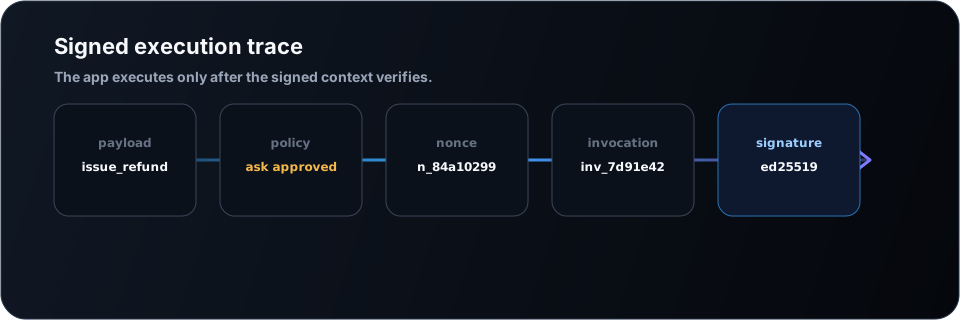
// verifies signature, body-hash, freshness, nonce-replay —
// then dispatches to your handler only if all of it passes
app.post("/arc/execute", arc.handleAction(actions, {
  issue_refund: async ({ input, appUserId, invocationId }) => {
    // invocation_id is your idempotency key — Arc may retry
    if (await refundAlreadyHandled(invocationId)) {
      return getStoredRefundResult(invocationId);
    }
    return issueRefund(appUserId, input);
  },
}, { apiUrl: process.env.ARC_API_URL, nonceStore }));
Durable nonce store
Replayed nonces must be rejected. The in-memory store is a local-dev helper only; in
production every app instance shares one durable store (Redis
SET NX PXAT — false means replay).
Idempotency by invocation_id
Arc may redeliver after a network failure. Write an idempotency row before the side effect. If your app succeeds but Arc never hears back, Arc marks the outcome unknown rather than blindly retrying.
Why signed, not a webhook
A plain webhook can be spoofed by anything that learns your URL. A verified ES256 signature means your app executes a refund only because Arc authorized this exact input, for this invocation, once.
05 · Execute
Your app does the work
Arc hands you a verified, authorized request — your code does the work. Arc never holds your database credentials or runs your business logic; it doesn't need to. Your handler returns a result (redacted in transit), and Arc records the outcome: executed, failed, or — if your app went silent after the side effect — unknown, flagged for reconciliation rather than silently retried.
06 · Audit
Hash-chained, and the blocks are recorded too
Every step emits an event to a redacted, append-only log: the request, the decision, the approval or denial, the signed execution, the outcome. Blocks and denials are recorded too — the things that didn't happen are often what an auditor most wants to see.
Each event stores
sha256(prev_hash + canonical_redacted_json),
so any reordering or edit breaks the chain and is detectable.
$ arc audit tail
$ arc audit verify     # recompute the chain, confirm integrity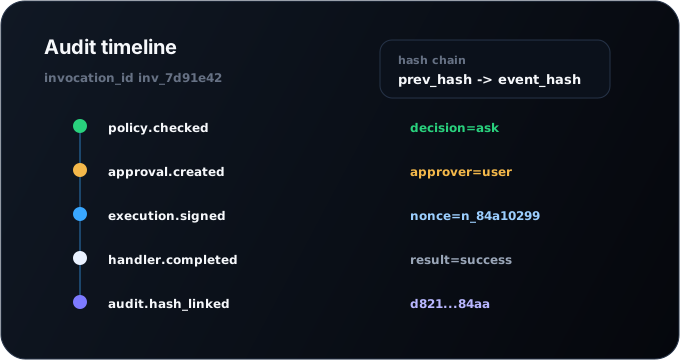
Honest scope
The chain is tamper-evident inside Arc's database — it detects modification; it is not by itself immune to a sufficiently privileged operator with direct database access. For stronger guarantees, export audit events and chain heads to immutable off-box storage or anchor them externally. We say this plainly because an audit log you can't trust under scrutiny isn't worth shipping.
Connect over MCP
Already speak MCP? Every tool call routes back through Arc.
The MCP adapter exposes each Arc action as an MCP tool — same name, same input schema, with risk level and default decision in the description. Every call is routed back through policy, approval, signed execution, audit. The adapter is transport only: it never executes business logic, never approves an action, never bypasses policy.
$ npm install @geostack/arc-mcp-adapter
$ export ARC_API_URL=https://app.geostack.xyz
$ export ARC_AGENT_TOKEN=<agent-token>
$ npx @geostack/arc-mcp-adapter start
MCP answers "what tools can the agent call?" Arc answers "should this call be allowed, right now?"
Where the line sits
Arc vs. your app
Why this matters
One company reportedly ran up ~$500M of Claude usage in a single month. Nobody had set a cap.
A consultant told Axios that one enterprise client spent roughly half a billion dollars on Claude in a single month, because no usage caps were set on employee licenses — token spend compounding across thousands of people running agentic workflows.
The company is unnamed and no company has confirmed the figure; it's the consultant's account via Axios. But the shape is corroborated on the record: Microsoft cancelled most internal Claude Code licenses, and Uber reportedly exhausted its 2026 AI budget by April. In each case the cap didn't exist or wasn't turned on.
Arc is the cap — and the approval, the signature, and the audit around the action it's spending on.
Source: Axios, via a consultant's account. Figure unconfirmed by the company. Microsoft / Uber details on the record.
Questions a careful engineer asks
- Does Arc see my production data or hold my credentials?
- No. Arc evaluates policy, signs the request, and audits the decision. Your app holds its own credentials and runs its own logic after verifying Arc's signature. Audit payloads are redacted to safe identifiers, never raw secrets.
- What happens if Arc is down?
- Your app only acts on a verified signature, so an Arc outage means new high-risk actions aren't authorized — it fails closed, not open. Work already signed and delivered is governed by your app's idempotency record.
- Is this the same as an LLM gateway or a spend dashboard?
- A gateway can cap tokens; that's commodity. Arc's job is the trust envelope around the action: approval when it's risky, a signed request your app can verify, and a tamper-evident record. The spend cap is one input to the decision, not the product.
- How do spend caps actually stop a runaway agent?
- An action carries an amount; Arc tracks cumulative spend against your cap and, at the policy step, flips an over-cap action from allow to ask or block before it's signed. The stop happens before the spend.
- Can a security reviewer verify the audit chain themselves?
- Yes — arc audit verify recomputes the chain, and you can export events plus chain heads. Note the honest scope: tamper-evident in-database; anchor externally for stronger evidence.
- What do I actually have to write?
- Two things: defineActions (your action contract) and handleAction (verify + execute), plus a durable nonce store and idempotency keyed on invocation_id. Arc handles policy, approval, signing, and audit.
Works with any agent or MCP server


Put one risky action behind Arc today.
Sign up for a free hosted workspace, integrate the SDK, and set a cap in five minutes — free, no credit card.